
You're twenty minutes into your stream, laughing at a joke in the chat, feeling like you're really connecting. Then, you glance at your preview screen and realize: you've been looking down this whole time. Because your phone is propped up against a coffee mug on your desk, your viewers have spent the last twenty minutes staring up your nostrils while you stared intently at your own face.
Don't worry, we've all been there. It’s the classic live stream tilt. When we first start going live, we naturally put our phones where it's easiest—flat on the desk, tilted slightly up, resting against a laptop or a stack of mail. But this creates a weird, accidental distance between you and the people hanging out with you. It feels less like a cozy kitchen-table chat and more like you're towering over them.
The Self-View Trap
Here’s the thing: it is incredibly hard not to look at yourself. Our eyes are naturally drawn to our own faces on screen to make sure our hair isn't doing something weird or that we don't have food on our teeth. But when you stare at your own video feed, to your viewers, you look like you’re staring down at their chin.
If you're already working on shaking off the pre-live jitters, adding eye contact anxiety to the mix is the last thing you need. Making actual eye contact on a live stream doesn’t require some expensive professional teleprompter or a high-end camera rig. It just takes a little bit of physical repositioning using things you already have lying around your room.
Your audience wants to look you in the eyes, not up your nose.
Enter the DIY Stack
The golden rule of stream framing is simple: your camera lens needs to be at eye level. Not your screen, but the actual tiny camera dot on your phone.
You don’t need to buy a fancy desktop tripod for this. Look around your room right now. Grab that massive hardback cookbook you never use, a couple of thick college textbooks, or even a sturdy shoebox. Stack them up on your desk until the top of the stack aligns right with your nose. Prop your phone up on top of that stack.
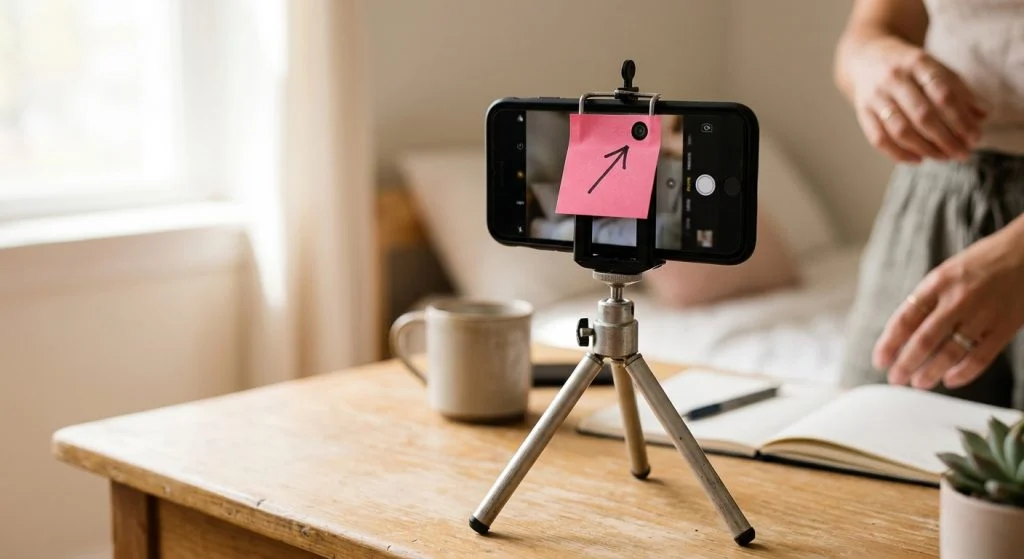
Suddenly, you aren't looming over your audience like a giant, and you aren't looking down at them. You're sitting across the table from them, having a coffee. It completely changes the energy of the room. While you're at it, you can easily pair this trick with other simple setup hacks, like designing a stream background with things you already own to make your whole frame feel warm and inviting.
The Sticky Note Trick
Now that your phone is at the right height, how do you stop staring at your own face? Here is a low-tech secret that works wonders: take a tiny sticky note, cut a little arrow out of it, and stick it on your phone pointing directly at the camera lens. You can even draw a little smiley face on it.
When you want to emphasize a point, share a quiet moment, or really welcome someone who just joined, look at the smiley face, not your screen. You don't have to stare at it the whole time—that gets creepy!—but flashing your eyes up to the actual camera lens when you say thank you or how is your day going? makes the person on the other end feel incredibly seen.
Give the textbook stack a shot on your next stream. It takes thirty seconds, costs zero dollars, and instantly makes your chat feel like a real, face-to-face hang.